GitHub - astral-sh/uv: An extremely fast Python package and project manager, written in Rust.
An extremely fast Python package and project manager, written in Rust. - astral-sh/uv
github.com
해당 내용을 참고하였습니다.
우선 python 3.7 이상이 기본적으로 설치 되어 있어야 합니다.
여기서는 uv 라는 것도 추천 하기에 pip로 설치하는 법도 제공합니다.
1. uv 설치하기
Install uv with our standalone installers:
# On macOS and Linux.
curl -LsSf https://astral.sh/uv/install.sh | sh
# On Windows.
powershell -ExecutionPolicy ByPass -c "irm https://astral.sh/uv/install.ps1 | iex"
pip에서 설치하는 방법
# With pip.
pip install uv
# Or pipx.
pipx install uv
2. uv를 통해 SuperClaude 설치하기
uv venv
source .venv/bin/activate
uv pip install SuperClaude
python3 -m SuperClaude installSuperClaude install
그럼 아래와 같이 설치가 진행되는데 저는 처음 항목에서 1번과 나머지 다 y를 진행했습니다.
[INFO] Executing operation: install
[INFO] Starting install operation
2025-07-20 20:20:46,348 - SECURITY - INFO - [ALLOW] Claude directory installation validated: /Users/dlawkrbs/.claude (PID: 31738)
[INFO] [ALLOW] Claude directory installation validated: /Users/dlawkrbs/.claude (PID: 31738)

============================================================
               SuperClaude Installation v3.0
        Installing SuperClaude framework components
============================================================

[INFO] Initializing installation system...

SuperClaude Installation Options:

Select installation type:
=========================
 1. Quick Installation (recommended components)
 2. Minimal Installation (core only)
 3. Custom Selection

Enter your choice (1-3):
> 1
[INFO] Validating system requirements...
[✓] All system requirements met
[!] Installation directory already exists: /Users/dlawkrbs/.claude
Continue and update existing installation? [y/N]
>  y

Installation Plan
==================================================
Installation Directory: /Users/dlawkrbs/.claude
Components to install:
  1. core - SuperClaude framework documentation and core files
  2. commands - SuperClaude slash command definitions

Estimated size: 132.2 KB

Proceed with installation? [Y/n]
> y
[INFO] Installing 2 components...
Creating backup of existing installation...

Installing core...
2025-07-20 20:20:56,241 - SECURITY - INFO - [ALLOW] Claude directory installation validated: /Users/dlawkrbs/.claude (PID: 31738)
[INFO] [ALLOW] Claude directory installation validated: /Users/dlawkrbs/.claude (PID: 31738)
[INFO] Installing SuperClaude core framework files...
2025-07-20 20:20:56,241 - SECURITY - INFO - [ALLOW] Claude directory installation validated: /Users/dlawkrbs/.claude (PID: 31738)
[INFO] [ALLOW] Claude directory installation validated: /Users/dlawkrbs/.claude (PID: 31738)
[INFO] Updated metadata with framework configuration
[INFO] Updated metadata with core component registration
[✓] Core component installed successfully (9 files)

Installing commands...
[INFO] Installing SuperClaude command definitions...
[INFO] Updated metadata with commands component registration
[✓] Commands component installed successfully (16 command files)

Running post-installation validation...
  ✓ commands: Valid
  ✓ core: Valid

All components validated successfully!
Installing: [██████████████████████████████████████████████████] 100.0% Installation complete ETA: 0s
[✓] Installation completed successfully in 1.2 seconds
[INFO] Installed components: commands, core
[INFO] Backup created: /Users/dlawkrbs/.claude/backups/superclaude_backup_20250720_202055.tar.gz
[✓] SuperClaude installation completed successfully!

Next steps:
1. Restart your Claude Code session
2. Framework files are now available in /Users/dlawkrbs/.claude
3. Use SuperClaude commands and features in Claude Code
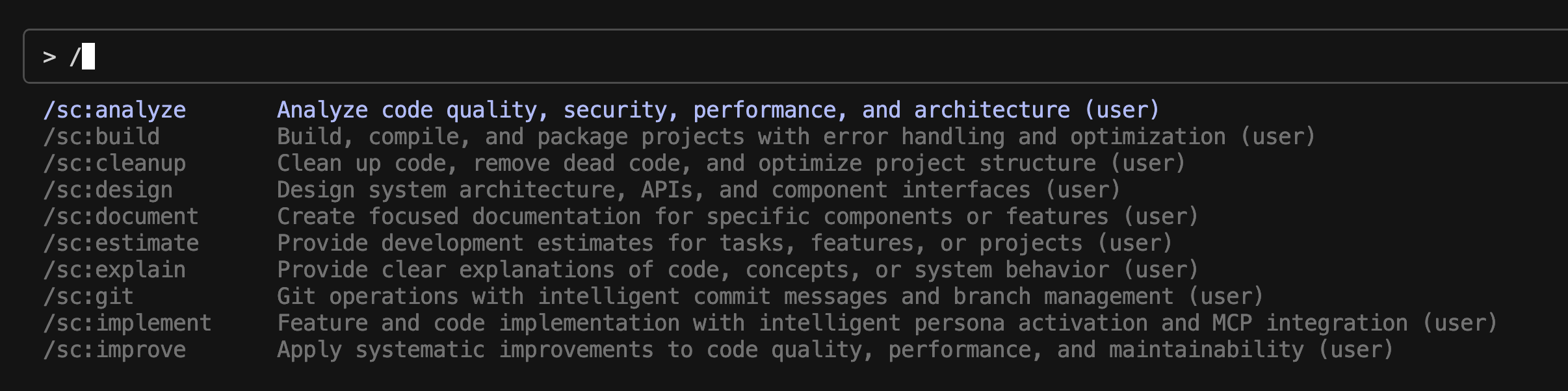
그후에 클로드를 다시 실행하면 아래와 같이 명령어들을 사용 할 수 있습니다.